


Creating high-quality videos used to take hours of recording and editing. Today, tools are smarter. And one tool that’s gaining serious attention is Focusee Screen Recorder.
If you're a content creator, educator, marketer, or business professional, you already know how important clear and engaging screen recordings are. But here’s the challenge — recording is easy; editing is not. That’s exactly where Focusee changes the game.
Developed by iMobie, this tool goes beyond simple screen capture. It combines recording with AI-powered editing to help creators produce professional-looking videos with minimal effort.
Let’s explore what makes it different — and why it might be the smartest recording tool available right now.
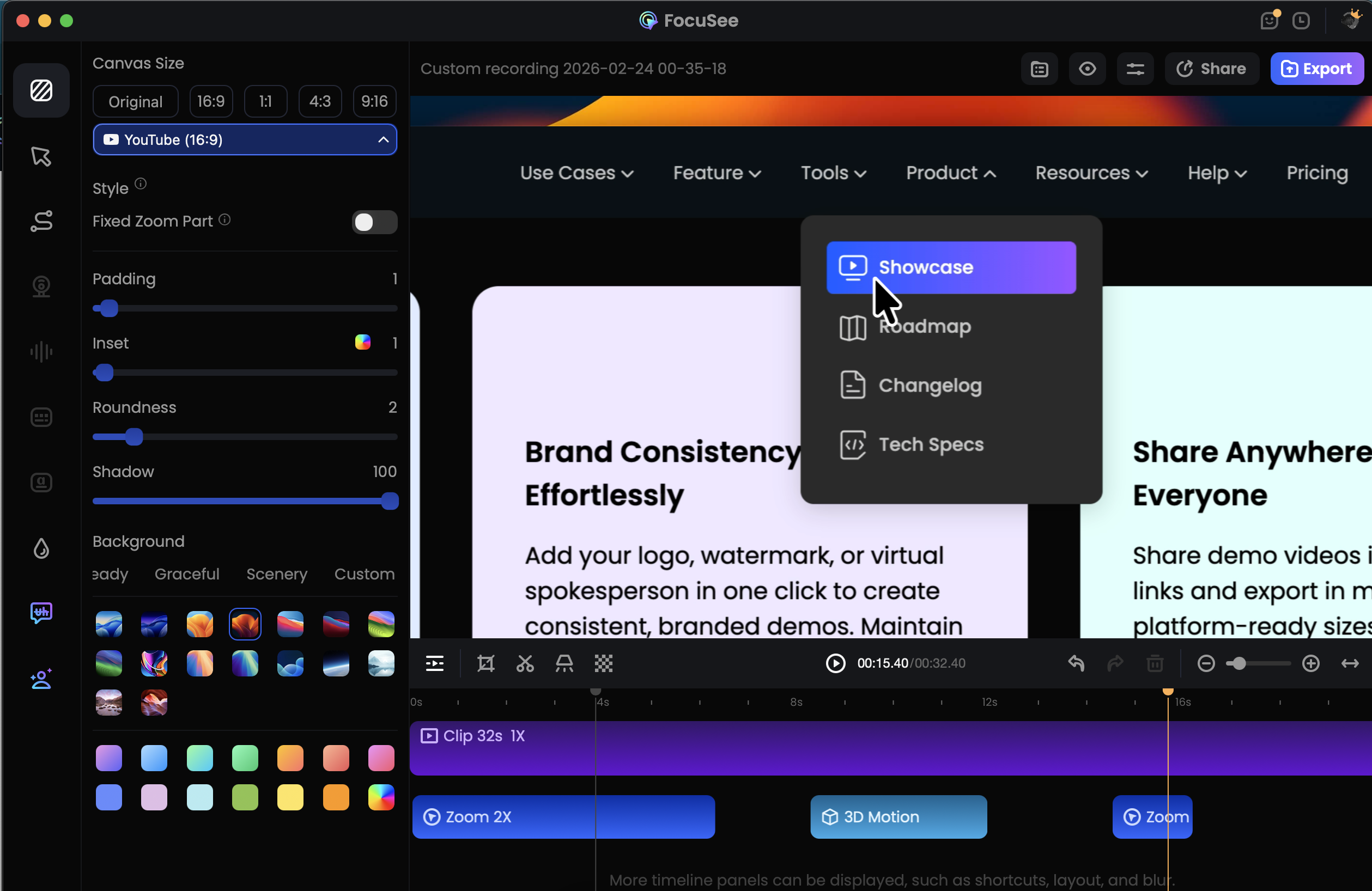
Focusee Screen Recorder is an AI-enhanced screen recording software designed to automatically transform raw recordings into polished videos.
Unlike traditional screen recorders that simply capture footage, Focusee:
And honestly, it delivers.
Video content is everywhere:
That’s why automation matters. And this is where Focusee Screen Recorder stands apart.
Instead of recording first and editing later, it enhances your video while you record.
One of the most impressive features of Focusee is its automatic zoom system.
As you move your mouse or click something important:
When creating tutorials, viewers often miss small details. Buttons and settings can look tiny on screen.
Focusee ensures your audience sees exactly what matters — without you touching editing software.
This single feature can cut editing time in half.
We all say “um,” “uh,” or pause while thinking. Editing those out manually is exhausting.
Focusee now includes AI-powered filler word detection and removal.
It automatically:
The result? Your video sounds smoother and more confident.
For educators and YouTubers, this is a huge time-saver.
Accessibility is no longer optional — it’s expected.
Focusee automatically generates subtitles in over 55 languages. That means:
Subtitles also help with SEO on platforms like YouTube.
Instead of manually transcribing your content, the software handles it instantly.
Poor audio ruins great videos.
Focusee improves your voice quality automatically by:
You don’t need expensive microphones or advanced sound software to sound professional.
For remote workers and online teachers, this feature is incredibly useful.
If you don’t want to show your face on camera, Focusee allows you to:
This is especially helpful for introverted creators or businesses that prefer brand-focused visuals.
It even supports up to 4K export, making it suitable for professional content.
Whether you’re recording software demos or smartphone app tutorials, the flexibility is impressive.
Instead of switching between multiple apps, everything happens inside one platform.
That streamlined workflow saves creators hours every week.
This tool is ideal for:
If your work involves explaining something on a screen, this tool makes it easier and more polished.
The difference is clear — automation is the future.
As a content creator myself, I understand how time-consuming editing can be. Recording is only half the battle — polishing is what takes hours.
After reviewing its features and updates, I can confidently say Focusee Screen Recorder stands out because it combines recording and AI-powered editing into one smooth workflow.
The automatic zoom, filler-word removal, subtitle generation, and 4K export make it a powerful tool for anyone serious about video content.
If you want to create professional videos faster — without drowning in editing software — I highly recommend giving Focusee Screen Recorder a try.
It’s built for creators. And honestly, it feels like the future of screen recording.
If you're a content creator, educator, marketer, or business professional, you already know how important clear and engaging screen recordings are. But here’s the challenge — recording is easy; editing is not. That’s exactly where Focusee changes the game.
Developed by iMobie, this tool goes beyond simple screen capture. It combines recording with AI-powered editing to help creators produce professional-looking videos with minimal effort.
Let’s explore what makes it different — and why it might be the smartest recording tool available right now.
What Is Focusee Screen Recorder?
Focusee Screen Recorder is an AI-enhanced screen recording software designed to automatically transform raw recordings into polished videos.
Unlike traditional screen recorders that simply capture footage, Focusee:
- Tracks your cursor
- Adds smart zoom effects
- Enhances audio
- Removes filler words
- Generates subtitles
- Supports 4K export
And honestly, it delivers.
Why Modern Creators Need Smart Screen Recording Tools
Video content is everywhere:
- Online courses
- YouTube tutorials
- SaaS product demos
- Social media explainers
- Corporate training
That’s why automation matters. And this is where Focusee Screen Recorder stands apart.
Instead of recording first and editing later, it enhances your video while you record.
AI Auto Zoom & Smart Focus Tracking
One of the most impressive features of Focusee is its automatic zoom system.
How It Works
As you move your mouse or click something important:
- The software detects the action
- Smoothly zooms into that area
- Adds cinematic motion effects
- Keeps transitions clean
Why This Is Powerful
When creating tutorials, viewers often miss small details. Buttons and settings can look tiny on screen.
Focusee ensures your audience sees exactly what matters — without you touching editing software.
This single feature can cut editing time in half.
AI Filler Word Removal (Yes, Really)
We all say “um,” “uh,” or pause while thinking. Editing those out manually is exhausting.
Focusee now includes AI-powered filler word detection and removal.
It automatically:
- Detects unnecessary pauses
- Removes filler sounds
- Cleans up speech flow
The result? Your video sounds smoother and more confident.
For educators and YouTubers, this is a huge time-saver.
AI Subtitle Generation in 55+ Languages
Accessibility is no longer optional — it’s expected.
Focusee automatically generates subtitles in over 55 languages. That means:
- Better accessibility
- Global audience reach
- Improved engagement
- Higher watch time
Subtitles also help with SEO on platforms like YouTube.
Instead of manually transcribing your content, the software handles it instantly.
AI Audio Enhancement & Noise Reduction
Poor audio ruins great videos.
Focusee improves your voice quality automatically by:
- Reducing background noise
- Enhancing speech clarity
- Balancing audio levels
You don’t need expensive microphones or advanced sound software to sound professional.
For remote workers and online teachers, this feature is incredibly useful.
Virtual AI Avatars for Privacy & Branding
One of the newest additions is AI virtual avatars.If you don’t want to show your face on camera, Focusee allows you to:
- Use AI-generated avatars
- Replace webcam footage
- Maintain privacy
- Add creative branding elements
This is especially helpful for introverted creators or businesses that prefer brand-focused visuals.
Flexible Recording Modes
Focusee Screen Recorder supports multiple recording styles:- Full screen recording
- Selected area recording
- Webcam + screen (picture-in-picture)
- Audio-only recording
- Mobile device recording (via USB)
It even supports up to 4K export, making it suitable for professional content.
Whether you’re recording software demos or smartphone app tutorials, the flexibility is impressive.
Built-In Editing & Visual Enhancements
Beyond recording, Focusee includes tools for:- Background cleanup
- Highlight effects
- Cursor emphasis
- Custom branding/watermarks
- Layout adjustments
Instead of switching between multiple apps, everything happens inside one platform.
That streamlined workflow saves creators hours every week.
Who Should Use Focusee Screen Recorder?
This tool is ideal for:
 Online educators
 YouTubers
 SaaS product teams
 Social media creators
 Remote business professionals
 Corporate trainers
If your work involves explaining something on a screen, this tool makes it easier and more polished.
How Focusee Screen Recorder Compares to Basic Recorders
| Feature | Traditional Screen Recorders | Focusee Screen Recorder |
|---|---|---|
| Auto Zoom |  Manual editing required Manual editing required |  Automatic Automatic |
| Filler Word Removal | No | Yes |
| AI Subtitles | Limited | 55+ Languages |
| Noise Reduction |  Basic Basic | AI Enhanced |
| 4K Export | Sometimes | Supported |
| Virtual Avatars | No | Yes |
The difference is clear — automation is the future.
Frequently Asked Questions (FAQs)
1. Is Focusee Screen Recorder beginner-friendly?
Yes. Its interface is clean, simple, and easy to navigate even for first-time users.2. Does it really remove filler words automatically?
Yes. The AI detects and removes filler words and pauses without manual editing.3. Can I export videos in 4K?
Yes, Focusee supports high-resolution export including 4K.4. Does it generate subtitles automatically?
Yes, it generates subtitles in over 55 languages.5. Is webcam recording supported?
Absolutely. You can record your screen and webcam simultaneously.6. Who developed Focusee Screen Recorder?
It was developed by iMobie, a trusted software development company.Is Focusee Screen Recorder Worth It?
As a content creator myself, I understand how time-consuming editing can be. Recording is only half the battle — polishing is what takes hours.
After reviewing its features and updates, I can confidently say Focusee Screen Recorder stands out because it combines recording and AI-powered editing into one smooth workflow.
The automatic zoom, filler-word removal, subtitle generation, and 4K export make it a powerful tool for anyone serious about video content.
If you want to create professional videos faster — without drowning in editing software — I highly recommend giving Focusee Screen Recorder a try.
It’s built for creators. And honestly, it feels like the future of screen recording.
Last edited by a moderator:
