

I recently tested Anijam to see whether it could do something more difficult than generating one attractive AI image:
Can it create one realistic fictional AI influencer and keep the same person consistent across completely different photos, outfits, poses, locations, and finally a talking video?
That became the main focus of this tutorial.
Instead of generating random AI models, I first created one original fictional adult influencer, selected the strongest base character, and then used that character as the permanent identity reference for every image and video afterward.
The interesting part wasn't simply whether Anijam could make a good image. I wanted to see whether the face, hair, body proportions, age, and overall visual identity would remain recognizable when everything else changed.
In the tutorial I go through the complete workflow:
One thing I specifically wanted to avoid was the usual “perfect AI model in perfect studio lighting” look.
Most of the image prompts therefore use realistic smartphone-photography details such as natural skin texture, imperfect framing, real environmental lighting, realistic camera settings, fabric behavior, hand positioning, and extensive negative prompts.
The result is closer to the kind of image you might actually see from a lifestyle or fashion creator on social media.
The video shows the generations themselves, so you can compare the character between scenes rather than relying only on screenshots.
For the tutorial, I deliberately used very different scenes.
The first test was designed to look like an ordinary smartphone photo rather than an AI render.
I used a compact aircraft-lavatory environment, warm overhead lighting, casual pastel styling, a travel accessory, realistic mirror behavior, smartphone exposure, and intentionally imperfect framing.
The important test was whether the original character's facial identity still survived the new clothing, lighting, mirror perspective, and pose.
Next I changed almost everything:
different clothing, seated pose, near-profile head rotation, strong golden-hour sunlight, foliage shadows, and a completely different color palette.
This is where character consistency becomes much easier to judge because the AI cannot rely on exactly the same camera angle.
The third image pushes the model further with a low-angle full-body composition, crouching posture, hands near the face, outdoor sunlight, shoes, clothing geometry, and multiple overlapping limbs.
These kinds of poses are useful for exposing problems with:
hands, knees, limbs, body proportions, facial identity, and clothing geometry.
I also generated a more polished evening/lifestyle image to see whether the same character could move between casual social-media photography and a more premium creator aesthetic without becoming a completely different person.
Everything remained tasteful and fully clothed—the point was character consistency, not explicit content.
The prompts in this tutorial are intentionally much more detailed than:
Each prompt follows roughly the same structure:
INSTRUCTION [LOCKED]
Strict character identity preservation instructions.
Core Aesthetic
The overall photographic look and creative direction.
Subject Identity & Styling
Face, hair, outfit, accessories, and character details.
Body Morphology / Character Proportions
Details that should remain consistent across generations.
Pose and Action
Exact limb placement, gaze direction, posture, and interaction.
Environment & Lighting
Location, light direction, color temperature, shadows, and environmental details.
Camera & Technical Specs
Lens equivalent, framing, shutter speed, ISO, depth of field, and smartphone-processing characteristics.
Negative Prompt
Common AI problems such as identity drift, extra fingers, broken anatomy, artificial skin, duplicated limbs, bad reflections, excessive bokeh, and other generation artifacts.
Using the same structure repeatedly makes it much easier to control what can change and what must remain locked.
The final test was animation.
I used one of the strongest character images as the video reference and instructed Anijam to preserve the character identity throughout every frame.
Instead of requesting dramatic movement, the video prompt focuses on small realistic behaviors:
This matters because an AI character can look convincing in a still image and then immediately become obviously artificial once the face starts moving.
I also included a second refinement prompt rather than pretending the first generation was automatically perfect.
The correction specifically asks Anijam to:
reduce unnecessary head movement, reduce hand movement, stabilize facial proportions, improve lip sync, preserve natural skin texture, and prevent the body or clothing from morphing between frames.
That generate → inspect → correct → compare workflow is probably the most useful part of the tutorial if you're trying to build a recurring AI character rather than just generating random clips.
I put the full character, image, video, and refinement prompts into one Google Doc so you can copy them directly and modify them for your own character.
Full Anijam AI Influencer Prompt Collection
GOOGLE DOC LINK
The collection includes:
You can replace the styling, clothing, environments, or character design while keeping the identity-locking structure.
If you want to test the same workflow yourself:
Disclosure: This is my referral/tracking link, so I may receive a commission or benefit if you sign up through it. It doesn't change your price.
From this test, the more useful way to think about Anijam isn't simply as an AI image generator.
The workflow becomes much more interesting when you first establish one character and then repeatedly reuse that identity for:
images → outfits → environments → social posts → video → voice → lip sync.
You still need to inspect generations carefully—especially hands, reflections, complex poses, and facial consistency during motion—but being able to refine the same concept is much more useful than generating unrelated AI characters every time.
This type of workflow could be useful if you're experimenting with:
AI influencer accounts, virtual models, lifestyle creator concepts, fashion content, UGC-style videos, fictional brand ambassadors, recurring characters, faceless social-media channels, or AI storytelling.
The same consistency workflow could also be adapted to completely different character styles.
Yes. The workflow I demonstrate starts with an original fictional character, establishes that character as the visual reference, and then reuses the same identity for additional images and video.
The main technique in my workflow is to create one approved reference character first and then explicitly treat that image as the ground truth in every later prompt. I also repeat the physical characteristics that must remain unchanged and clearly separate them from things the AI is allowed to modify, such as clothing, pose, lighting, and environment.
That's one of the tests included in the tutorial. I take one of the finished character images and use it as the visual reference for a vertical talking video with controlled motion, dialogue, voice, and lip synchronization.
I've shared the complete prompt collection here: GOOGLE DOC LINK
I'd be interested to see how other people approach character consistency.
What causes the most trouble in your workflow right now—the face, hands, body proportions, or keeping the character stable once you turn the image into video?
Can it create one realistic fictional AI influencer and keep the same person consistent across completely different photos, outfits, poses, locations, and finally a talking video?
That became the main focus of this tutorial.
Instead of generating random AI models, I first created one original fictional adult influencer, selected the strongest base character, and then used that character as the permanent identity reference for every image and video afterward.
The interesting part wasn't simply whether Anijam could make a good image. I wanted to see whether the face, hair, body proportions, age, and overall visual identity would remain recognizable when everything else changed.
What does this Anijam AI influencer tutorial cover?
In the tutorial I go through the complete workflow:
- creating an original realistic AI influencer from scratch
- choosing and locking the main character identity
- writing detailed prompts for stronger character consistency
- creating realistic smartphone-style influencer photography
- testing the same character across very different poses and environments
- checking facial and body consistency between generations
- creating casual travel/lifestyle content
- generating more polished fashion/lifestyle creator images
- turning the character from an image into a video
- generating natural character movement
- adding dialogue, voice, and lip sync
- identifying AI-looking motion or character drift
- refining the generated video instead of starting again
- comparing the original and corrected versions
One thing I specifically wanted to avoid was the usual “perfect AI model in perfect studio lighting” look.
Most of the image prompts therefore use realistic smartphone-photography details such as natural skin texture, imperfect framing, real environmental lighting, realistic camera settings, fabric behavior, hand positioning, and extensive negative prompts.
The result is closer to the kind of image you might actually see from a lifestyle or fashion creator on social media.
Watch the full tutorial
The video shows the generations themselves, so you can compare the character between scenes rather than relying only on screenshots.
The character consistency test
For the tutorial, I deliberately used very different scenes.
1. Realistic travel mirror selfie
The first test was designed to look like an ordinary smartphone photo rather than an AI render.
I used a compact aircraft-lavatory environment, warm overhead lighting, casual pastel styling, a travel accessory, realistic mirror behavior, smartphone exposure, and intentionally imperfect framing.
The important test was whether the original character's facial identity still survived the new clothing, lighting, mirror perspective, and pose.
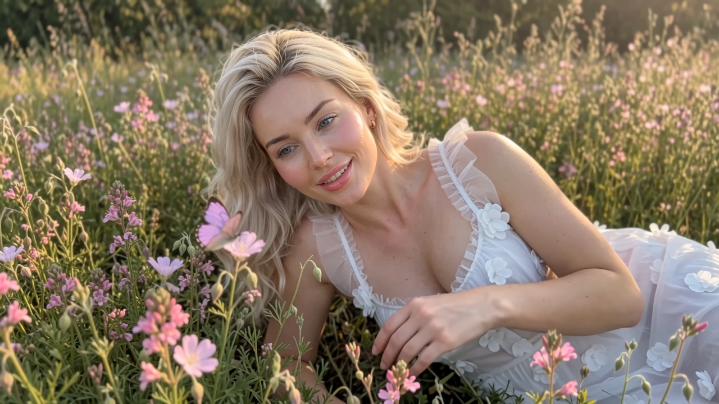
2. Golden-hour garden portrait
Next I changed almost everything:
different clothing, seated pose, near-profile head rotation, strong golden-hour sunlight, foliage shadows, and a completely different color palette.
This is where character consistency becomes much easier to judge because the AI cannot rely on exactly the same camera angle.
3. Full-body outdoor pose
The third image pushes the model further with a low-angle full-body composition, crouching posture, hands near the face, outdoor sunlight, shoes, clothing geometry, and multiple overlapping limbs.
These kinds of poses are useful for exposing problems with:
hands, knees, limbs, body proportions, facial identity, and clothing geometry.
4. Premium lifestyle creator image
I also generated a more polished evening/lifestyle image to see whether the same character could move between casual social-media photography and a more premium creator aesthetic without becoming a completely different person.
Everything remained tasteful and fully clothed—the point was character consistency, not explicit content.
How I structured the prompts
The prompts in this tutorial are intentionally much more detailed than:
“Create a realistic blonde AI influencer.”
Each prompt follows roughly the same structure:
INSTRUCTION [LOCKED]
Strict character identity preservation instructions.
Core Aesthetic
The overall photographic look and creative direction.
Subject Identity & Styling
Face, hair, outfit, accessories, and character details.
Body Morphology / Character Proportions
Details that should remain consistent across generations.
Pose and Action
Exact limb placement, gaze direction, posture, and interaction.
Environment & Lighting
Location, light direction, color temperature, shadows, and environmental details.
Camera & Technical Specs
Lens equivalent, framing, shutter speed, ISO, depth of field, and smartphone-processing characteristics.
Negative Prompt
Common AI problems such as identity drift, extra fingers, broken anatomy, artificial skin, duplicated limbs, bad reflections, excessive bokeh, and other generation artifacts.
Using the same structure repeatedly makes it much easier to control what can change and what must remain locked.
From AI image to AI video
The final test was animation.
I used one of the strongest character images as the video reference and instructed Anijam to preserve the character identity throughout every frame.
Instead of requesting dramatic movement, the video prompt focuses on small realistic behaviors:
- natural blinking
- subtle head movement
- limited hand gestures
- relaxed eye contact
- natural breathing
- stable facial proportions
- stable body proportions
- realistic smartphone camera movement
- accurate lip synchronization
This matters because an AI character can look convincing in a still image and then immediately become obviously artificial once the face starts moving.
Refining the result
I also included a second refinement prompt rather than pretending the first generation was automatically perfect.
The correction specifically asks Anijam to:
reduce unnecessary head movement, reduce hand movement, stabilize facial proportions, improve lip sync, preserve natural skin texture, and prevent the body or clothing from morphing between frames.
That generate → inspect → correct → compare workflow is probably the most useful part of the tutorial if you're trying to build a recurring AI character rather than just generating random clips.
Download / copy the complete prompt collection
I put the full character, image, video, and refinement prompts into one Google Doc so you can copy them directly and modify them for your own character.
Full Anijam AI Influencer Prompt Collection 
GOOGLE DOC LINK
The collection includes:
- original fictional character foundation prompt
- strict character-lock template
- realistic travel mirror-selfie prompt
- golden-hour garden prompt
- full-body outdoor prompt
- premium lifestyle creator prompt
- talking AI influencer video prompt
- character-stability and lip-sync refinement prompt
- detailed negative prompts
You can replace the styling, clothing, environments, or character design while keeping the identity-locking structure.
Try Anijam
If you want to test the same workflow yourself:
Anijam → Link
Disclosure: This is my referral/tracking link, so I may receive a commission or benefit if you sign up through it. It doesn't change your price.
Quick answer: Can Anijam create a consistent AI influencer?
From this test, the more useful way to think about Anijam isn't simply as an AI image generator.
The workflow becomes much more interesting when you first establish one character and then repeatedly reuse that identity for:
images → outfits → environments → social posts → video → voice → lip sync.
You still need to inspect generations carefully—especially hands, reflections, complex poses, and facial consistency during motion—but being able to refine the same concept is much more useful than generating unrelated AI characters every time.
Who is this workflow useful for?
This type of workflow could be useful if you're experimenting with:
AI influencer accounts, virtual models, lifestyle creator concepts, fashion content, UGC-style videos, fictional brand ambassadors, recurring characters, faceless social-media channels, or AI storytelling.
The same consistency workflow could also be adapted to completely different character styles.
FAQ
Can I create an AI influencer with Anijam?
Yes. The workflow I demonstrate starts with an original fictional character, establishes that character as the visual reference, and then reuses the same identity for additional images and video.
How do you keep the same AI character consistent?
The main technique in my workflow is to create one approved reference character first and then explicitly treat that image as the ground truth in every later prompt. I also repeat the physical characteristics that must remain unchanged and clearly separate them from things the AI is allowed to modify, such as clothing, pose, lighting, and environment.
Can Anijam turn an AI influencer image into video?
That's one of the tests included in the tutorial. I take one of the finished character images and use it as the visual reference for a vertical talking video with controlled motion, dialogue, voice, and lip synchronization.
Where can I get the prompts?
I've shared the complete prompt collection here: GOOGLE DOC LINK
Where can I watch the full tutorial?
I'd be interested to see how other people approach character consistency.
What causes the most trouble in your workflow right now—the face, hands, body proportions, or keeping the character stable once you turn the image into video?