

New model families tend to arrive as a pair: a full version and a faster one. With Kling 4.0 and Kling 4.0 Flash, the choice is easier than it looks if you start from the project instead of the model. The Kling 4.0 page on Seedance 2.5 has a compact comparison table of the announced ranges. Creation is marked as coming soon there, so this is a good moment to plan rather than generate.
This thread walks through the table, a short question order for picking a version, how to organise references and keyframes for the full model, and a small script that checks a project brief against the table.
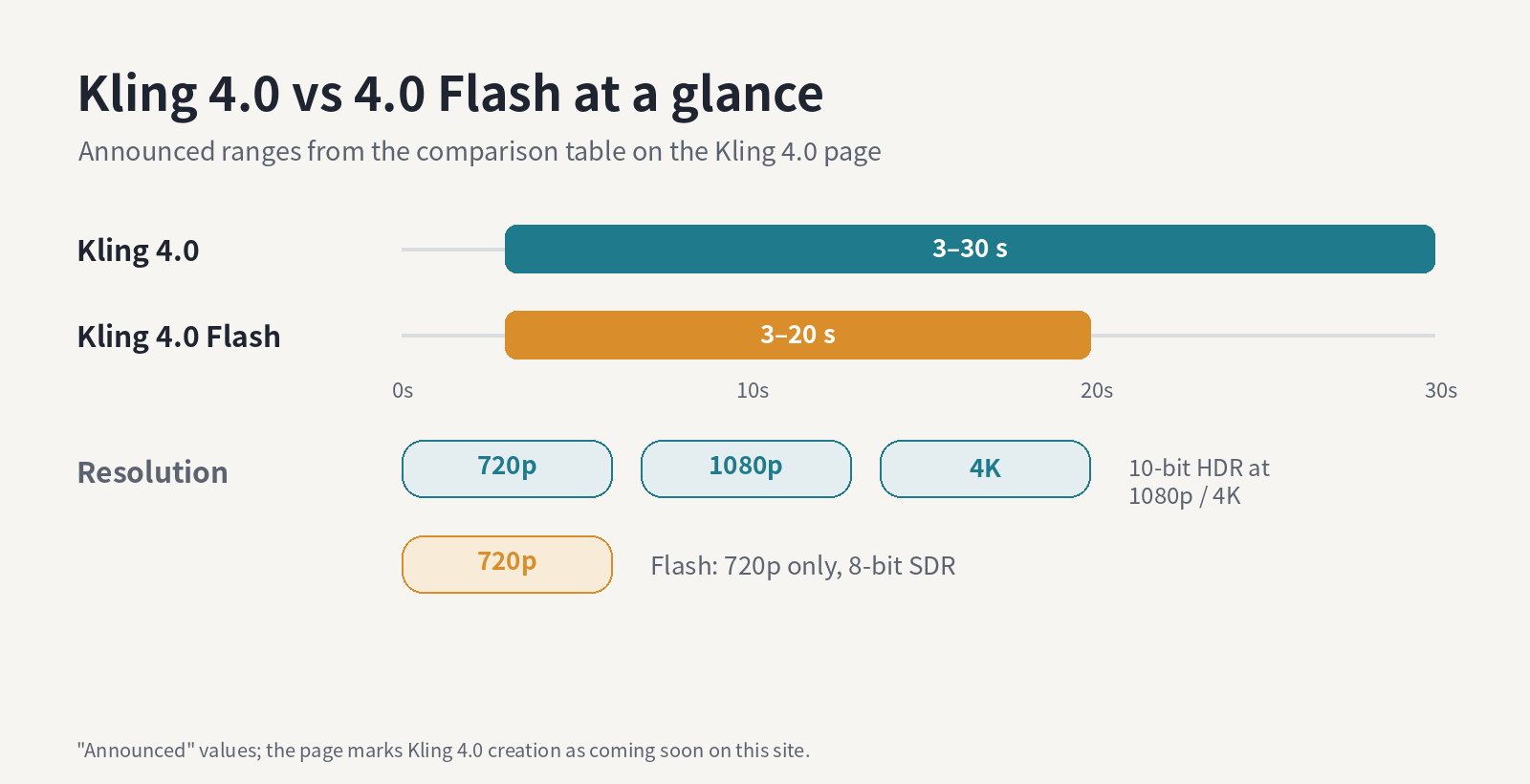
Announced ranges, redrawn from the Kling 4.0 page. Diagram made for this post.
The comparison on the page boils down to five rows:
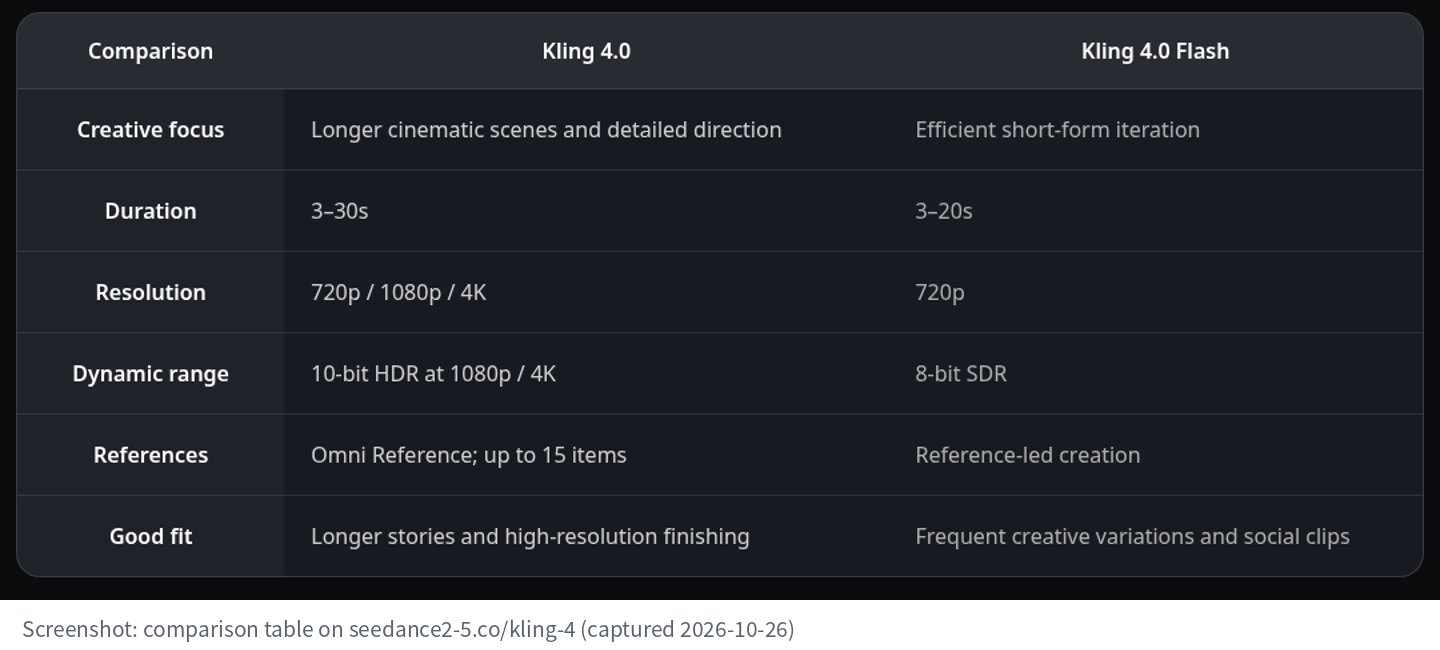
Screenshot of the comparison table, captured 2026-10-26.
All of these are described on the page as announced values. Treat them as planning numbers and re-check them when creation opens.
Most projects are decided by the first question that rules a version out. Duration and delivery format are hard limits; iteration speed is a preference. So ask the hard questions first.
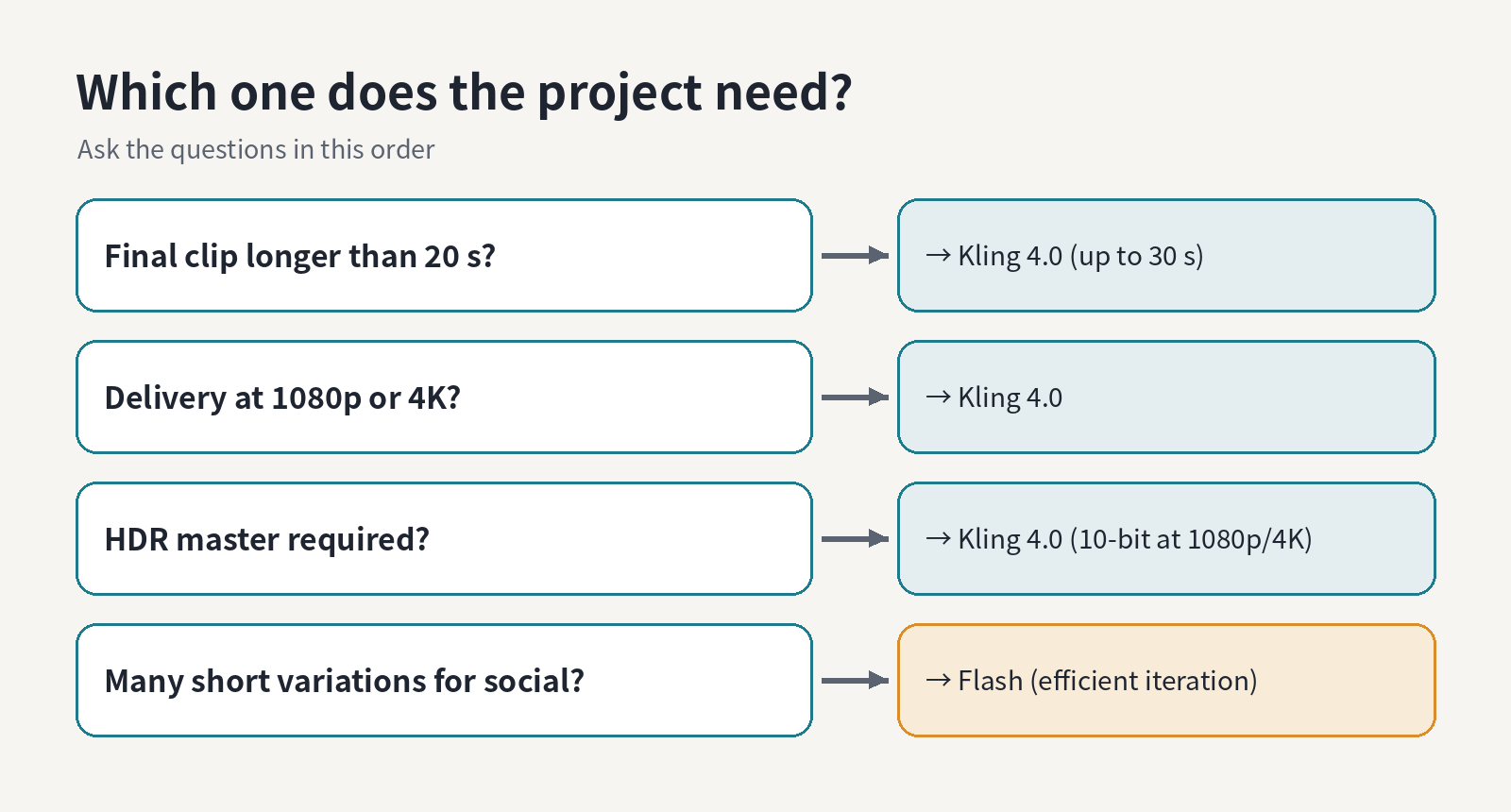
A question order for choosing. Diagram made for this post.
If the final clip runs past 20 seconds, Flash is out. If you deliver at 1080p or 4K, or need an HDR master, Flash is out. Only when the hard limits allow both does the soft question matter: are you making many short variations for social, where Flash's focus on frequent iteration is the point?
It is easy to read a table like this as "full version good, fast version cheap". The page frames it differently: Flash's good fit is frequent creative variations and social clips. If a campaign needs ten openings to compare, a model built for short-form iteration is the right tool for that stage even when the final clip goes to the full version. Plan the exploration and the finishing as two separate jobs, and pick a version for each.
That split also keeps comparisons fair. Versions made with the same model, same subject and same framing, changing one creative variable at a time, are what the page's FAQ recommends comparing.
I like to keep project specs in one place, so I wrote a 24-line Python check that copies the table's values and tests a brief against each version. Here it is on three sample briefs: a 15-second vertical teaser, a 25-second product film with an HDR master, and a 40-second one-take brand story.
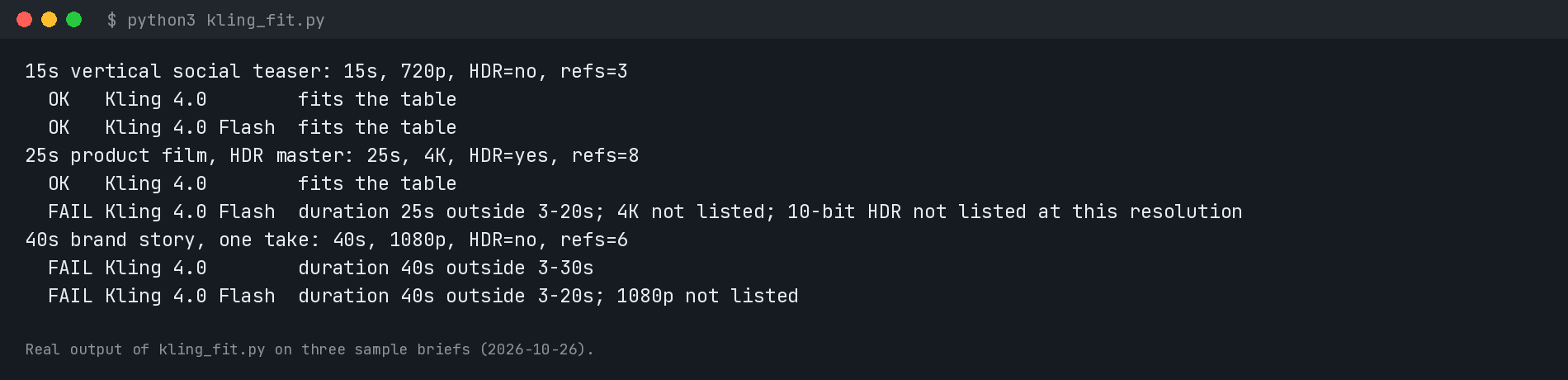
Real output of the script, run on 2026-10-26. The projects are samples written for this post.
The third brief is the interesting one: neither version fits a 40-second single clip. That is a brief problem, not a model problem. Split it into two scenes with a clear cut, or tighten it to 30 seconds.
The page describes Omni Reference as accepting up to 15 items across supported categories, and suggests organising appearance, movement and voice references by role so the identity stays clear across shots. Fifteen is a ceiling, not a target. A role sheet like this keeps you honest about what each item is doing:
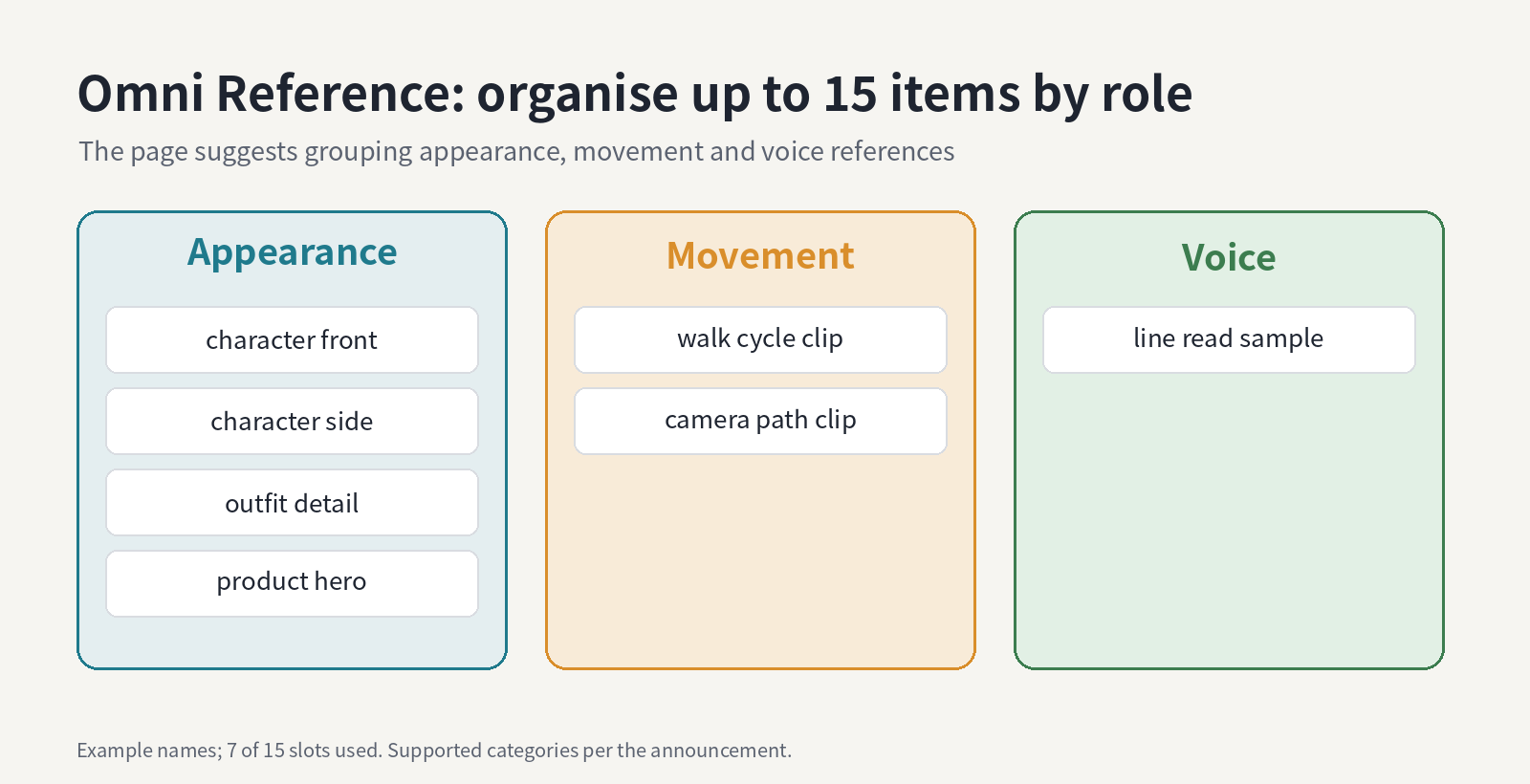
Example role sheet using 7 of 15 slots. Diagram made for this post.
The FAQ adds a practical point: name the appearance, colour, clothing and silhouette you want to keep, and avoid changing identity, environment and lighting all at once.
The announced duration range comes with up to 10 keyframes. The page's advice is to use key moments for an opening position, a meaningful change and a concluding state instead of overloading every second. In practice: place those three first, then add extra keyframes only where the path between two beats is ambiguous.
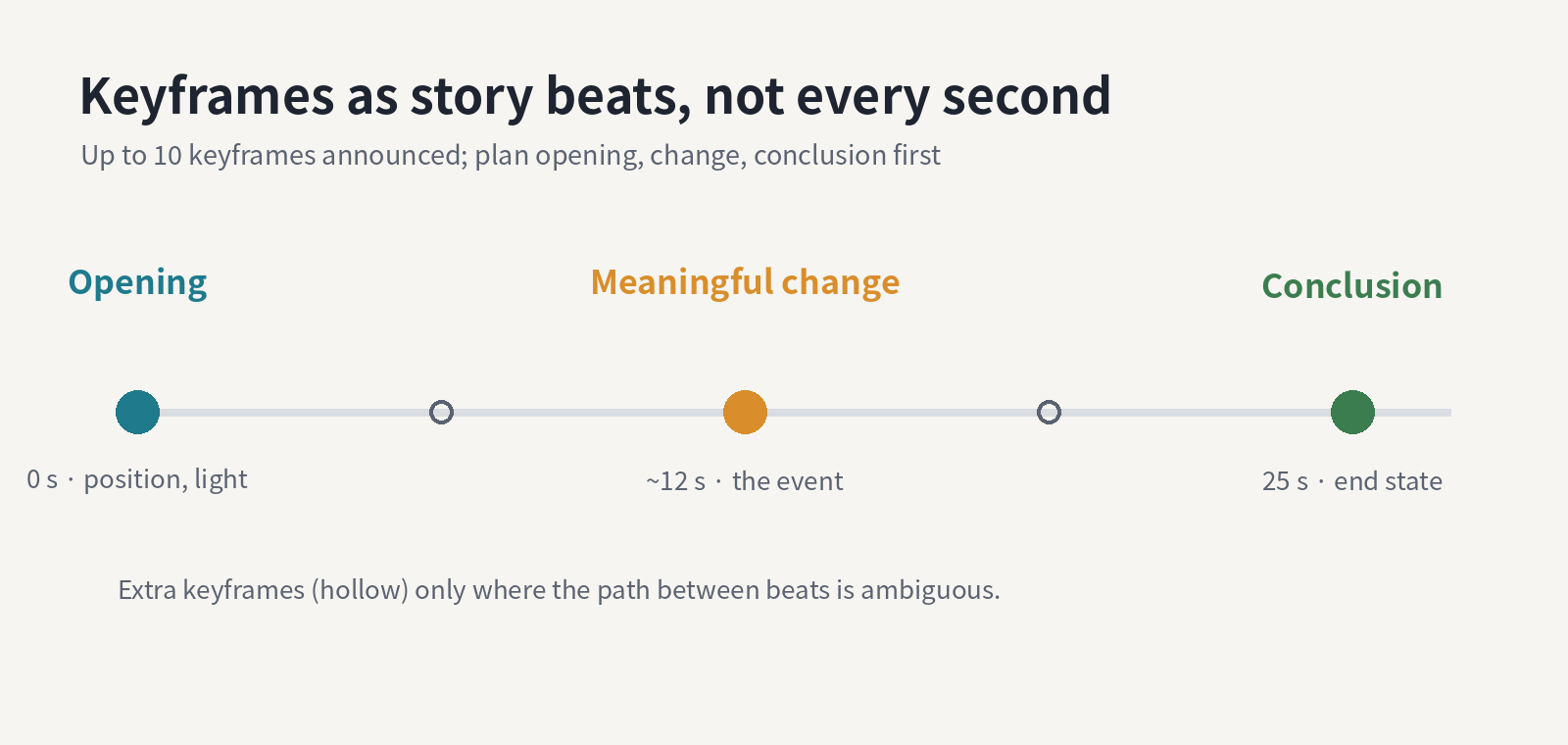
A keyframe plan for a 25-second clip. Diagram made for this post.
This also matches the page's earlier suggestion to separate the opening, the main event and the ending. A clearly staged event is easier to evaluate than several competing actions, and makes later versions comparable.
One last row-adjacent tip from the page: match portrait, square, landscape or ultrawide composition to where the clip will run, rather than cropping the main action away afterwards. If the project fits Flash's 720p, that decision matters even more, because there is less resolution to crop from.
How are others planning around the 20-second Flash limit? I am leaning toward Flash for exploring the opening beat and the full model for the finished sequence, but I would like to hear other splits.
This thread walks through the table, a short question order for picking a version, how to organise references and keyframes for the full model, and a small script that checks a project brief against the table.
Announced ranges, redrawn from the Kling 4.0 page. Diagram made for this post.
What the table says
The comparison on the page boils down to five rows:
- Creative focus: Kling 4.0 is for longer cinematic scenes and detailed direction; Flash is for efficient short-form iteration.
- Duration: 3–30 seconds for Kling 4.0, 3–20 seconds for Flash.
- Resolution: 720p, 1080p and 4K for Kling 4.0; 720p for Flash.
- Dynamic range: 10-bit HDR at 1080p and 4K for Kling 4.0; 8-bit SDR for Flash.
- References: Omni Reference with up to 15 items for Kling 4.0; reference-led creation for Flash.
Screenshot of the comparison table, captured 2026-10-26.
All of these are described on the page as announced values. Treat them as planning numbers and re-check them when creation opens.
Ask the questions in this order
Most projects are decided by the first question that rules a version out. Duration and delivery format are hard limits; iteration speed is a preference. So ask the hard questions first.
A question order for choosing. Diagram made for this post.
If the final clip runs past 20 seconds, Flash is out. If you deliver at 1080p or 4K, or need an HDR master, Flash is out. Only when the hard limits allow both does the soft question matter: are you making many short variations for social, where Flash's focus on frequent iteration is the point?
Do not underrate Flash
It is easy to read a table like this as "full version good, fast version cheap". The page frames it differently: Flash's good fit is frequent creative variations and social clips. If a campaign needs ten openings to compare, a model built for short-form iteration is the right tool for that stage even when the final clip goes to the full version. Plan the exploration and the finishing as two separate jobs, and pick a version for each.
That split also keeps comparisons fair. Versions made with the same model, same subject and same framing, changing one creative variable at a time, are what the page's FAQ recommends comparing.
A tiny script that does the checking
I like to keep project specs in one place, so I wrote a 24-line Python check that copies the table's values and tests a brief against each version. Here it is on three sample briefs: a 15-second vertical teaser, a 25-second product film with an HDR master, and a 40-second one-take brand story.
Real output of the script, run on 2026-10-26. The projects are samples written for this post.
The third brief is the interesting one: neither version fits a 40-second single clip. That is a brief problem, not a model problem. Split it into two scenes with a clear cut, or tighten it to 30 seconds.
Python:
lo, hi = s["dur"]
if not lo <= p["dur"] <= hi: why.append(f"duration {p['dur']}s outside {lo}-{hi}s")
if p["res"] not in s["res"]: why.append(f"{p['res']} not listed")
if p["hdr"] and p["res"] not in s["hdr"]: why.append("10-bit HDR not listed at this resolution")
If you choose Kling 4.0: organise references by role
The page describes Omni Reference as accepting up to 15 items across supported categories, and suggests organising appearance, movement and voice references by role so the identity stays clear across shots. Fifteen is a ceiling, not a target. A role sheet like this keeps you honest about what each item is doing:
Example role sheet using 7 of 15 slots. Diagram made for this post.
The FAQ adds a practical point: name the appearance, colour, clothing and silhouette you want to keep, and avoid changing identity, environment and lighting all at once.
Keyframes are story beats
The announced duration range comes with up to 10 keyframes. The page's advice is to use key moments for an opening position, a meaningful change and a concluding state instead of overloading every second. In practice: place those three first, then add extra keyframes only where the path between two beats is ambiguous.
A keyframe plan for a 25-second clip. Diagram made for this post.
This also matches the page's earlier suggestion to separate the opening, the main event and the ending. A clearly staged event is easier to evaluate than several competing actions, and makes later versions comparable.
Compose for the final placement
One last row-adjacent tip from the page: match portrait, square, landscape or ultrawide composition to where the clip will run, rather than cropping the main action away afterwards. If the project fits Flash's 720p, that decision matters even more, because there is less resolution to crop from.
How are others planning around the 20-second Flash limit? I am leaning toward Flash for exploring the opening beat and the full model for the finished sequence, but I would like to hear other splits.