

Most people know tools like ElevenLabs for text-to-speech and voice cloning. You upload a recording, type some text, and get speech back. The experience is convenient, but the actual processing usually happens through a cloud service.
VoiceStudio tries to bring much of that workflow onto your own machine.
It combines voice cloning, voice design, speech generation, video dubbing, transcription, dictation, and audiobook creation in one application. It also exposes its capabilities through a local API and an MCP server, which means AI coding agents can use it as a speech-generation tool.
The repository describes support for 646 languages, although the actual languages and capabilities available depend on the selected engine and installed models.
I went through the repository, feature catalogue, and technical documentation. There is quite a bit more going on here than the usual voice-cloning demo.
So what exactly is VoiceStudio?
VoiceStudio is an open-source AI voice application developed by Palash Debnath and contributors.
Its central idea is straightforward: run speech-related AI workflows locally, using models installed on your own hardware, rather than requiring a paid cloud API for every generation.
The application is organised around three broad workflows:
- Create: Clone an existing voice, design a new voice, and generate speech from text.
- Produce: Transcribe, dub, narrate, and process audio or video.
- Connect: Expose speech capabilities through APIs, MCP, reusable recipes, and automation.
1. Voice cloning — generate speech using a reference voice
This is probably the feature most people will look at first.
You provide a clean reference recording, create a voice profile, and use that profile to generate new speech from text.
The general workflow looks like this:
- Open Voice Cloning.
- Select an existing voice or add a reference recording.
- Provide the text you want to generate.
- Select the appropriate language and generation settings.
- Generate and export the resulting audio.
VoiceStudio also supports different speech engines. The default experience uses the k2-fsa/OmniVoice ecosystem, but the application includes other engines through its Model Manager.
This is a useful design decision. Instead of tying the entire application to one model, VoiceStudio provides an interface for working with multiple speech-generation systems.
2. Voice design — create a voice without uploading a recording
What if you don't have a reference recording?
Voice design addresses that situation.
Instead of cloning an existing voice, you describe the kind of voice you want. For example:
The application maps the description into voice-design attributes and creates a voice profile using a compatible engine.A calm male narrator in his early thirties, with a warm, slightly deep voice, a neutral international English accent, and a measured speaking style.
This is useful for creating different narration styles, fictional characters, and voices for projects where you don't want to reuse an existing person's voice.
There is an important distinction here: voice design and voice cloning are different operations. One creates a voice from descriptive attributes; the other uses a reference recording.
3. Video dubbing — more than translating subtitles
This is one of the more substantial features in the project.
A typical video-dubbing workflow involves several separate problems:
- Extracting and preparing the source media.
- Transcribing the original dialogue.
- Identifying speakers.
- Translating the dialogue into another language.
- Generating speech using selected voices.
- Fitting the generated speech into the original timing.
- Mixing and exporting the final video.
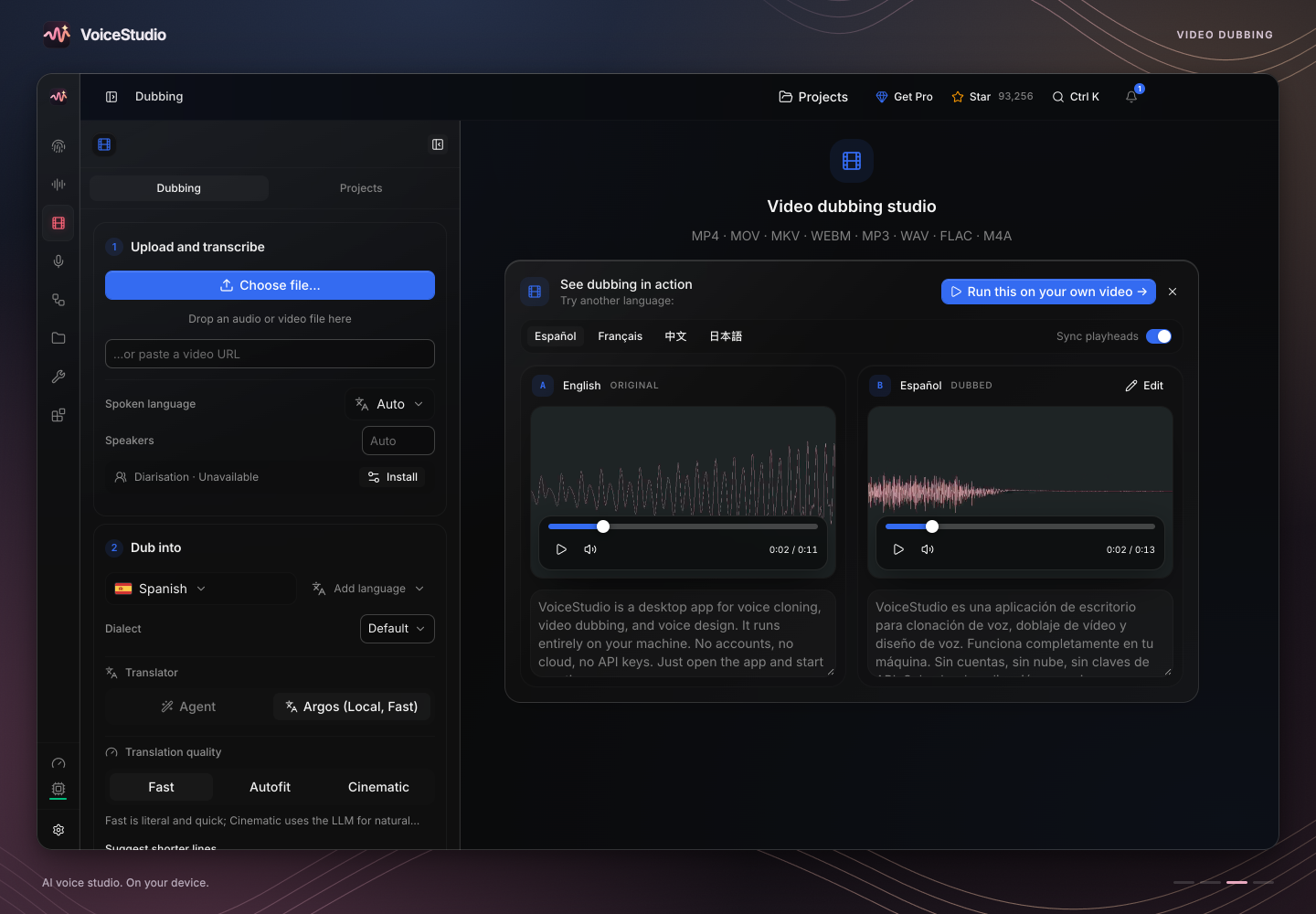
You can import audio or video, review the source transcript, translate the dialogue, edit individual segments, assign voices to speakers, and generate the dubbed version.
The editor also provides timing controls and different fitting strategies. This matters because translated sentences often have different lengths from their original versions.
For example, a short English sentence might become considerably longer in another language. Simply replacing the audio would cause the new dialogue to run over the next scene.
VoiceStudio's dubbing workflow includes options such as Smart Fit, Stretch Video, and Lip sync, alongside per-speaker voice matching and export controls.
It also supports importing subtitle files such as SRT, which can be useful when a video already has a prepared transcript.
One thing I appreciate about this approach is that it treats dubbing as an editing workflow rather than pretending translation plus text-to-speech automatically produces a finished video.
There are still several quality variables to consider: translation accuracy, pronunciation, speaker identification, timing, and how naturally the generated voices fit the original footage.
4. Transcription and dictation
VoiceStudio isn't limited to generating audio. It can also convert speech into text.
The project includes several speech-recognition options, including:
- WhisperX
- Faster-Whisper
- MLX Whisper
- PyTorch Whisper
- Parakeet TDT
- Moonshine
- FunASR
- sherpa-onnx
There is also a floating dictation widget for capturing speech and converting it into text. This makes the application useful beyond content production.
For example, you could use local transcription for:
- Turning recorded meetings into text.
- Transcribing interviews.
- Dictating notes.
- Processing audio files.
- Creating subtitles.
- Feeding audio transcripts into an AI workflow.
5. Audiobooks, stories and batch generation
Another feature worth mentioning is the ability to create longer narration projects.
Rather than generating one short sentence at a time, VoiceStudio includes batch queues and workflows for stories and audiobooks.
This is useful when you have a long script or multiple pieces of text to process.
You can work with voice profiles, generate speech, and manage queued jobs instead of manually repeating the same operation for every paragraph.
For creators, this could be useful for video narration, educational material, long-form storytelling, and other projects that require repeated voice generation.
The part I find most interesting: VoiceStudio has an MCP server
This is where the project becomes more interesting from a developer's perspective.
VoiceStudio includes an MCP server that allows compatible AI agents to interact with its speech capabilities.
MCP (Model Context Protocol) provides a standard way for AI applications to connect to external tools. Instead of asking an AI agent to generate audio through a browser manually, you can expose VoiceStudio's local backend as a tool.
According to the project's documentation, its MCP server provides tools including:
| Tool | What it does |
|---|---|
generate_speech | Converts text into generated audio |
clone_voice | Creates a voice profile from reference audio |
describe_voice | Maps a text description to voice attributes |
design_voice | Creates a voice profile from a description |
transcribe | Converts audio into text |
list_voices | Lists available voice profiles |
list_languages | Lists supported languages |
check_health | Checks backend status and GPU information |
With the appropriate VoiceStudio connection and voice profile configured, the agent can call the speech-generation tool instead of trying to implement text-to-speech itself.Generate a spoken version of this announcement using my saved narrator voice and export the audio.
The same general idea could be used in automated content workflows, development tools, local assistants, and applications that need speech generation.
The MCP server is mounted on the running backend, so it does not require a completely separate speech service to be started.
There is also an option to return generated audio as files rather than sending large audio payloads directly into the AI conversation. This is a sensible detail because WAV audio encoded as Base64 can consume a surprising amount of context.
Documentation: https://github.com/debpalash/VoiceStudio/blob/main/docs/mcp.md
How does the technical architecture work?
Looking through the repository, the project is split into several major parts:
frontend/— application interface.electron/— desktop application and native integration.backend/— Python speech-processing backend.mobile/— mobile application code.omnivoice/— OmniVoice-related components.docs/— installation, engine, API, and feature documentation.
This separation is useful because the same backend can serve more than one interface.
A desktop application, script, custom GUI, or AI agent can communicate with the local speech service through its supported interfaces.
The documentation describes several ways to connect:
- HTTP API for audio files and scripts.
- WebSocket for streaming transcription.
- MCP over HTTP.
- MCP over standard input/output for compatible clients.
3900, and the project documents an OpenAI-compatible transcription endpoint.This is particularly useful for developers who want to integrate speech recognition into an existing application without building the entire model-management and inference pipeline themselves.
What models does it support?
VoiceStudio isn't tied to a single speech model.
Its feature catalogue includes several speech-generation engines, such as:
- OmniVoice
- CosyVoice 3
- KittenTTS
- MLX-Audio
- VoxCPM2
- MOSS-TTS
- GPT-SoVITS
- sherpa-onnx
- IndexTTS
- PocketTTS
- Supertonic
Some engines have different hardware requirements and platform limitations. Not every engine will be available on every computer, and installing VoiceStudio doesn't mean every model is already downloaded.
The Model Manager lets users choose which engines and models they want to install.
I think this is a better approach than bundling every possible model into one enormous installer. Speech models can be large, and different users have different hardware and quality requirements.
Installation: how to get started
The project provides installers for Windows, macOS, and Linux, alongside Docker support.
The repository currently documents these installation commands.
macOS / Linux:
curl -fsSL https://voicestudio.sh/install | shWindows PowerShell:
irm https://voicestudio.sh/install.ps1 | iexYou can also download the appropriate installer from the official website:
https://voicestudio.sh/
Once installed, open VoiceStudio, navigate to Voice Cloning, select a voice or add a reference recording, enter your text, and generate speech.
The application asks before downloading a model.
If you want to build the project from source, the documented development workflow is:
Code:
git clone https://github.com/debpalash/VoiceStudio.git

cd VoiceStudio

bun run devbun run setup:apiCheck the installation documentation for platform-specific requirements and troubleshooting:
https://github.com/debpalash/VoiceStudio/tree/main/docs
Does it need a powerful GPU?
Not necessarily, but hardware makes a difference.
The project supports CPU execution, although generation can be considerably slower. Depending on the platform and engine, it can also use NVIDIA CUDA, Apple Silicon Metal acceleration, AMD ROCm, or Vulkan-based native engines.
The current platform overview is:
| Platform | Project status |
|---|---|
| macOS (Apple Silicon) | Stable |
| Windows 10/11 (x64) | Stable |
| Linux (x64) | Stable |
| Docker | Stable |
| Android 10+ | Preview |
| iPhone / iPad | Preview |
| Windows on ARM | Experimental |
| Intel Mac | Limited |
The Intel Mac limitation is worth noting: the project describes it as an application interface that connects to a remote backend, rather than the same fully local setup available on Apple Silicon.
A GPU also doesn't automatically guarantee that every engine will use it. The selected model, installed dependencies, drivers, available memory, and backend all matter.
The project includes a performance guide that explains how to identify the active compute device and troubleshoot slow generation.
https://github.com/debpalash/VoiceStudio/blob/main/docs/performance.md
A few things I'd check before replacing a cloud voice service
VoiceStudio is an interesting alternative, but I wouldn't treat it as a drop-in replacement for every ElevenLabs workflow without testing it first.
There are a few practical considerations.
1. Local processing means local hardware requirements
You don't need to pay a cloud API for every generation when using a supported local engine, but your computer is doing the work.
Model downloads, memory usage, processing speed, and GPU compatibility become your responsibility.
2. The first generation can be slower
Models need to load into memory, and some backends perform additional initialisation or compilation. The first generation after starting the application can therefore be slower than subsequent generations.
3. Language support depends on the engine
The project advertises 646 languages, but that shouldn't be interpreted as every engine supporting all 646 languages equally well.
Language availability, voice quality, pronunciation, and transcription accuracy depend on the selected model and workflow.
4. The application licence and model licences are different
This is an important one, particularly for businesses and content creators.
VoiceStudio's application is licensed under AGPL-3.0. The licence permits commercial use subject to its terms and obligations.
However, the speech models, model weights, and other assets have their own licensing conditions. An open-source application does not automatically make every model it can run commercially usable.
The repository even maintains a model licence inventory, which documents unresolved licence reviews and asset families.
So before using a particular model in a commercial product, check its actual licence rather than assuming that the application's AGPL licence covers everything.
https://github.com/debpalash/VoiceStudio/blob/main/docs/licensing/model-inventory.md
5. Voice cloning needs consent
The project explicitly states that you should only clone a voice with its owner's permission.
That matters. Voice cloning can be useful for personal narration, accessibility, production, and authorised voice work, but it can also be misused for impersonation.
Having a recording of someone's voice does not mean you have permission to reproduce it.
Where this gets interesting
I think the most interesting direction for projects like VoiceStudio isn't simply replacing a cloud text-to-speech website.
It's making speech generation a reusable local capability.
Imagine a local AI assistant that can listen to a recording, transcribe it, summarise it, and read the result back using a voice you configured.
Or an AI coding agent that generates narration for a software demo, creates audio assets for an application, or processes a folder of recordings without sending every file to an external speech API.
The combination of a local backend, multiple model engines, HTTP interfaces, streaming transcription, and MCP makes those workflows possible to explore.
There is still work involved in choosing the right models, configuring hardware, and getting good results. But the architecture is already moving beyond a simple voice-cloning interface.
If I were exploring local AI audio development, this is the kind of project I'd keep on my list.
Explore VoiceStudio
- GitHub repository: https://github.com/debpalash/VoiceStudio
- Official website: https://voicestudio.sh/
- Documentation: https://github.com/debpalash/VoiceStudio/tree/main/docs
- Feature and engine catalogue: https://github.com/debpalash/VoiceStudio/blob/main/docs/feature-catalog.md
- MCP integration: https://github.com/debpalash/VoiceStudio/blob/main/docs/mcp.md
- Performance guide: https://github.com/debpalash/VoiceStudio/blob/main/docs/performance.md
- Discord community: https://discord.gg/voicestudio